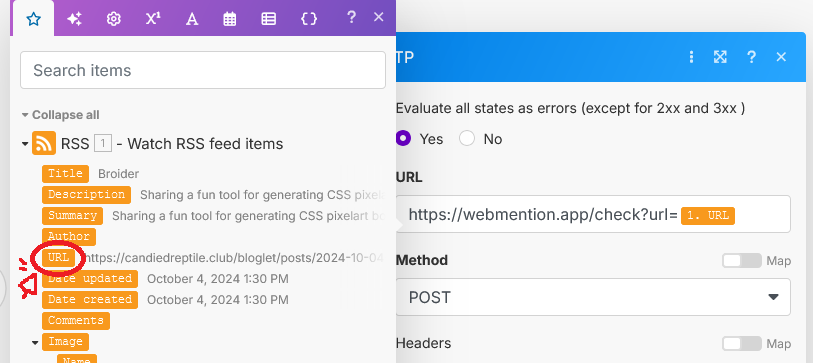
Setup is ongoing, but I am implementing webmentions on this blog in order to notify other webmention-using bloggers that I've linked to their posts & receive notifications when my posts are linked elsewhere in their turn. Introduction to the concept and invaluable help was provided by A Non-Technical Intro to Webmentions by Natalie Nex-3. It's very clear and helpful.
For automatic outgoing webmention processing when an RSS feed is updated, Natalie recommends webmention.app, which in its turn recommends IFTTT, which is how I learned that IFTTT doesn't offer free webhooks anymore as of this year. Woe! Sorrow! Bullshit! With some fumbling I've gotten an equivalent set up on make.com and this post is my test of whether that is working.
To set up webmention.app as a Make.com scenario:
- Add a module of the type "RSS" and choose "Watch RSS feed items." Enter your RSS feed URL.
- Hover over the right side of that bubble and "Add another module."
- Choose the module "HTTP" and the action "Make a request".
- Begin the URL field with "https://webmention.app/check?url=". Then, insert the placeholder representing the RSS feed item's post URL. (See below.) Add your webmention.app token to the end if you're using one.
- Change Method to POST.
- Click "Run Once" in the bottom left to save the scenario.
- Underneath that, choose how often you'd like the scenario to run and toggle the switch to ON.